In the series AI at Work, we show what AI already does for our clients: work that was impossible until recently, or took hours to complete. No stories or fake promises, but real AI use cases from our studio. Client names are anonymized where needed.
Today: a law firm, where random use of stock images led to copyright claims.

Copyright claims on used images online
Our client, a law firm in this case, received copyright claims for images that they used on their website. During development we used free images from Pexels and Unsplash, but over the years of content input, other images found their way onto the site. Some were their own photos, some came from free libraries, and some… as it turned out came from paid sources without a license.
The question they asked us was simple: can you check which images cause a copyright issue?
Our first reaction was honest. There is no practical way to manually verify the origin of every image on a large website. But it sounded like something AI can easily solve and we gave it a try!
Step 1: crawl every image on the site
Before you can check images, you need to know which images you have and where they live. We crawled the full website with our Screaming Frog software tool and exported every image together with the pages where it appears. Why not ask AI to crawl them? It would use a lot of tokens and AI still crawls with hallucinated URLs. This means AI invents URLs on a website because it expects the page to exist, even if it doesn’t. From our AI SEO research paper, AI scrapes 30%+ on scraping pages that do not exist because of made-up URLs. Making AI obviously less performant for the scraping part in this case.
That last part matters more than it sounds. An image is rarely used once. If a photo appears on three different pages and turns out to be a problem, it needs to be swapped on all three. A flat list of image files is not enough: the client needs to know exactly where it needs to be changed.
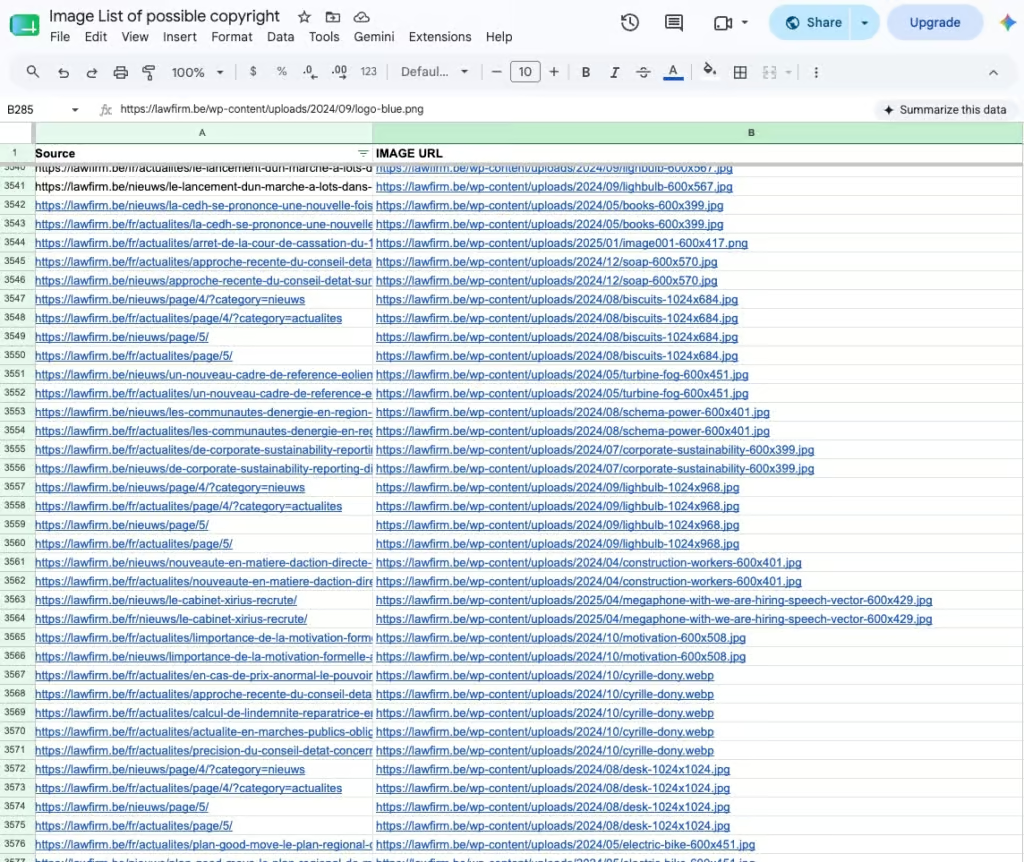
The crawl surfaced more than 1,000 images spread across almost 4,000 pages (in different languages). We exported everything to a Google Sheet we could share with the client, with each image linked to every page it appears on.
Step 2: quick wins by filename
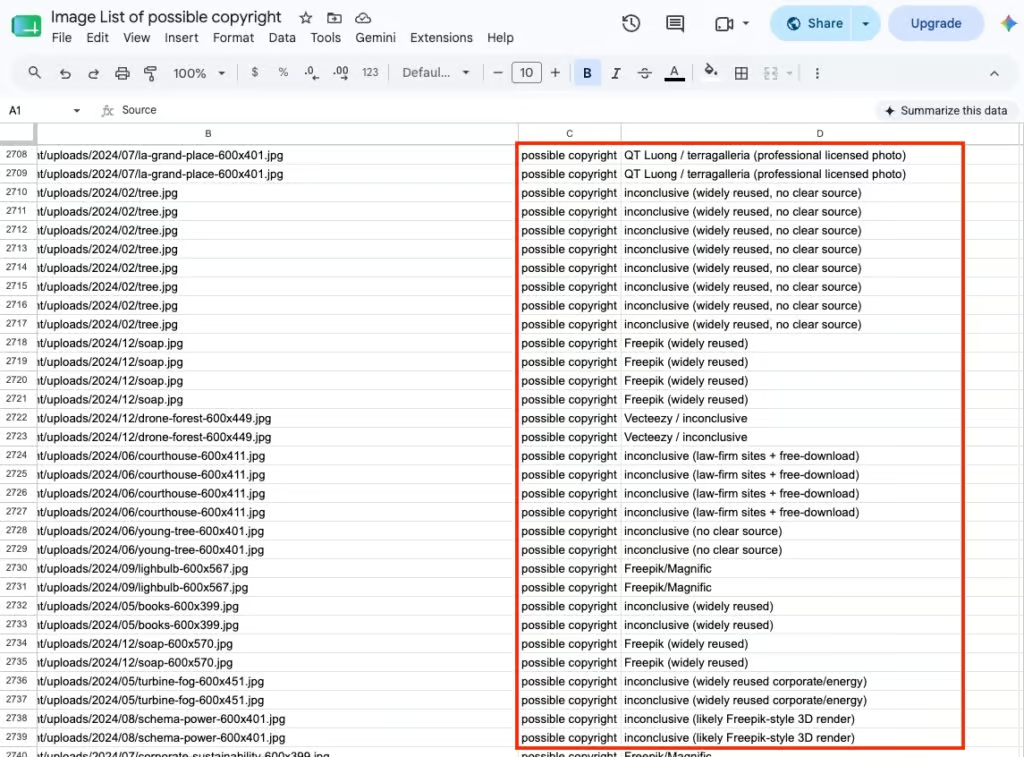
Before running any deep analysis, we let Claude scan the list on filenames alone. Stock images often carry their origin in their name: an Unsplash ID, a photographer credit, a stock library naming pattern. This first check flags the obvious cases in seconds and keeps the heavier analysis focused on the images that actually need it. This keeps AI token usage low, which matters when you run a heavier AI feature on a thousand items.
Marking items by filename is something only possible by AI, unless you know all the used libraries upfront. Simply asking AI to check obvious copyright issues based on the filenames does the trick. It quickly marks images as an issue or possible issue from the following image libraries: iStock, QT Luong, Terragalleria, Freepik, Vecteezy, Magnific, iStock, Dreamstime, Alamy and Shutterstock. There was no way I would manually guessed all of these or find a pattern that those libraries use.
It’s easy with AI and this step eases things up significantly afterwards. A lot of images are hereby already filtered out and marked as issue/possible issue. The time AI spent for checking the filenames is also super low. It flies through lists like this. Hence, also the token cost. The actual reverse image-search on the internet is something else.
The image below shows the example of an image marked as issue because the filename spills it. (The yellow marker is to mask our clients name)

Step 3: bulk reverse image search with AI
Next is the core of the workflow: a bulk reverse image search on every remaining unique image. Claude checked each image one by one against the web with the image search feature and tries to find it elsewhere on the web. (in stock libraries for example)
To keep the output usable, we gave it three simple rules per image:
- Leave the field blank when the image is 100% free to use
- Mark as “possible issue” when the origin is uncertain
- photos the firm took themselves for example
- Mark as “issue” when it clearly is a copywrite violation, and write down why.
- found in a paid library, found on other websites, or matching a known licensed source
Very simple & straight forward so a lawyer opening that sheet sees three categories and knows what to do with each of them. (and why it’s marked as such)
The result: less than 15 minutes instead of a full day
The entire process, from crawl to annotated Google Sheet, took about 15 minutes of processing. Doing the same work manually, running close to 1,000 images through a reverse image search by hand and noting the findings, would have taken at least a full day. Realistically, probably nobody would have done it at all.
The best thing now with AI? It took only 15 minutes, but actually… just 5. Setting up the Google Sheet & prompt. The 10 minutes AI took to complete the reverse image search query on all images it did on it’s own. I didn’t need to see the AI do the tasks, so I simply did another task in the meantime and checked back on it 30mins later if it was already done.
The client received one shared sheet: every image on their site, every page it appears on, and a clear verdict per image. Their team could work through the flagged items, replace where necessary, and respond to the claims with a complete overview instead of guesswork.
Why this works as an AI use case
An ideal case for our first AI at work episode. Not a chatbot on a homepage, or a prompt in Claude to “list all images and check copyrigh”, but a workflow that combines the right tools: a crawler to gather the data, a spreadsheet the client can actually use, and AI for the part no human wants to do a thousand times in a row. The right sparkle of AI usage where it’s really beneficial to use AI.
Reverse image search has existed for years. What changed is that AI can run it by itself, at scale, interpret the results, and translate it into a decision per image.
That turns an impossible request into a 15-minute job. Thank you AI & Technologie!
Worried about the images on your own site?
Most organizations have no idea where the images on their website came from. If you inherited a site, switched agencies along the way, or have multiple people uploading content, chances are there are images in there nobody can account for.
We can run this check for you. Tell us about your project, and we will tell you what is hiding in your media library.